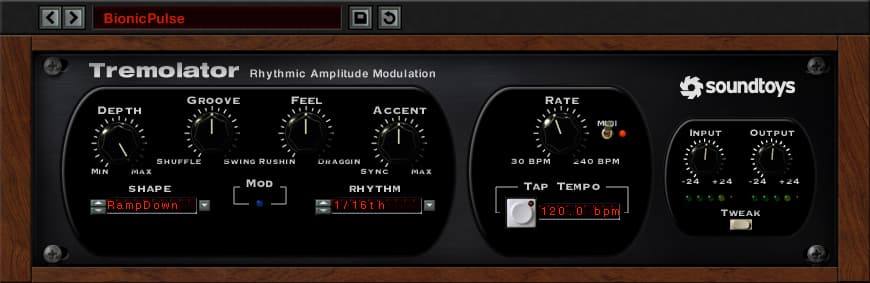
Tremolator
Tremolo and Auto-Gate
Analog Guitar Tremolo Effects and Beyond with Beat-Synced Rhythmic Chopping
Need tremolo? Soundtoys has got you covered. Tremolator emulates the tremolo effect of classic hardware like the old Fender Vibrolux guitar amp and even the great tremolo sound of the Wurlitzer electric piano.
Soundtoys added dynamic control of speed and depth that lets the tremolo respond to the music, and then tossed in MIDI sync to lock your tremolo to tempo. Of course, Soundtoys also included a programmable Rhythm Editor that lets you write custom patterns and turn Tremolator into an outrageous rhythmic auto-gate. Vintage guitar effect and modern remix tool at your service.
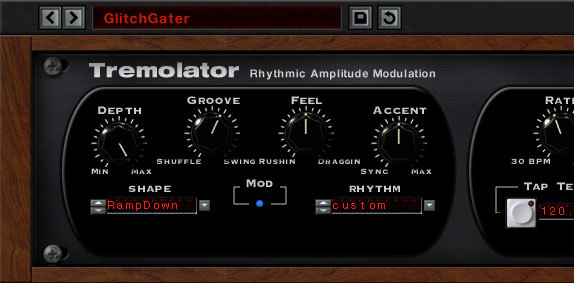
Tremolo of Old
Soundtoys broke out the test equipment and analyzed the waveforms created by some of their favourite old hardware. Then Soundtoys used the custom LFO waveshape editor built into Tremolator to perfectly recreate them.
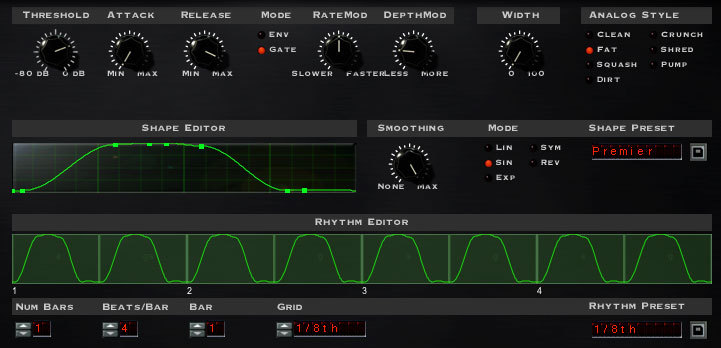
It’s very interesting to look at these shapes and see why each of these vintage pieces has a unique sound. Pass that through Soundtoys' Analog mode, which emulates going in and out of a piece of analog hardware, and you’ve got all the pieces of a great-sounding tremolo.
Chop Shop: Auto-Gate Mania
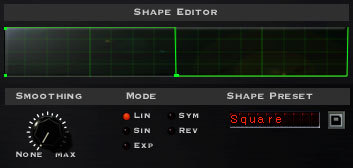
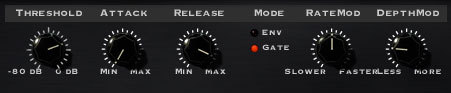
Switch the nice smooth tremolo waveforms over to a sharp squarewave and you turn this into a monster of an auto-gate. You can lock it to MIDI with the flip of a switch, then select 1/8th notes, 16th notes or whatever fits the rhythm you need.
If straight note pulses aren’t what you need, use the Rhythm Editor to write your own cool groove (You can even pull a groove from Soundtoys' library). More? Add some swing or shuffle, accents, and analog mode. You can even use the Waveshape Editor to tighten or loosen the gate time.
Get Dynamic
In the Tweak menu, you’ll find the Dynamics controls. These parameters let your playing control the speed and/or depth of the modulation.
You can create cool speedups or slowdowns based on how loud or soft you play. You can create smooth increases in depth as your chords fade out, or heavy tremolo that fades away. Plus there are already some great presets in Soundtoys Dynamics folder that you can “tweak” to fit your needs.
Features
- Unmatched auto-gate rhythmic control for a powerful remix tool.
- Lock to MIDI for tempo and beat-synced tremolo.
- Dynamic controls allow real-time musical and emotional expression.
System Requirements
Mac
- macOS 10.12 Sierra and later (Intel / Apple Silicon supported) (64-bit only)
- VST2, VST3, AU, AAX Native, AAX AudioSuite
Windows
- Windows 7 and later (64-bit only)
- VST2, VST3, AAX Native, AAX AudioSuite
Supported Sample Rates:
- Minimum - 44.1 kHz
- Maximum - 192 kHz
Important Notes:
- A FREE account at ilok.com is required (a physical USB iLok is not required)
- This software is 64-bit only and is not compatible with 32-bit systems.
Officially Supported Host Applications:
All version 5 Soundtoys products come in 64-bit VST2, VST3, AU and AAX Native plugin formats.
Supported DAWs:
- Pro Tools 11 - 2022.6 (Mac & PC: AAX Native and AudioSuite)
- Logic Pro X - 10.7 (Mac: AudioUnits)
- Ableton Live 9.2.2 - 11 (Mac: AudioUnits & VST; Windows: VST)
- Studio One 4.5+ (Mac: AudioUnits & VST; Windows: VST)
- Cubase 9.5 - 12 (Mac & PC: VST)
- Nuendo 8 - 11 (Mac & PC: VST)
- Reaper 6 (Mac: AudioUnits & VST; Windows: VST)
- Bitwig 4 (Mac & PC: VST)
Introducing Tremolator, your go-to plugin for tremolo and auto-gate effects that bring the classic vibes of analog guitar sounds to your fingertips, and so much more. Whether you're chasing the nostalgic tremolo effects of vintage hardware like the Fender Vibrolux guitar amp or the Wurlitzer electric piano, Tremolator has you covered. But it doesn't stop there. This plugin is designed to adapt and respond dynamically to your music, adding a layer of expression that truly elevates your sound. Tremolator lets you sync your tremolo to the tempo with MIDI integration, ensuring your effects are always on beat. And with the programmable Rhythm Editor, you can create custom patterns, transforming Tremolator into a powerful rhythmic auto-gate. It's like having a vintage guitar effect and a modern remix tool all in one package. What makes Tremolator stand out is its meticulous recreation of classic tremolo waveforms. Soundtoys has broken out the test equipment to analyze and replicate the waveforms from their favorite old hardware. Using the custom LFO waveshape editor, they’ve captured the unique sound of these vintage pieces. When you pass these through Soundtoys' Analog mode, which emulates the nuances of analog hardware, you get a rich, authentic tremolo sound. But what if you want to switch things up? With Tremolator, you can turn those smooth tremolo waveforms into sharp, edgy squarewaves for an auto-gate effect that’s nothing short of monstrous. Lock it to MIDI with just a flip of a switch, and choose from 1/8th notes, 16th notes, or whatever rhythm fits your needs. If straight note pulses aren't your thing, dive into the Rhythm Editor to craft your own groove or draw from Soundtoys' extensive library. Add a bit of swing, shuffle, or accents, and toggle the analog mode for even more texture. The Waveshape Editor also lets you tweak the gate time to perfection. In the Tweak menu, you'll find the Dynamics controls, which are a game-changer for real-time expression. These parameters let your playing dictate the speed and depth of the modulation. Create dramatic speedups or slowdowns based on your volume, or let your chords dictate the depth of the tremolo as they fade out. And if you're looking for inspiration, explore the presets in the Soundtoys Dynamics folder and tweak them to suit your style. Tremolator boasts unmatched auto-gate rhythmic control, making it a powerful tool for remixing. With MIDI sync capabilities, your tremolo effects will always be in perfect harmony with your track’s tempo. And the dynamic controls ensure your musical expression is always at the forefront. Ready to take your sound to the next level? Tremolator is compatible with both Mac and Windows systems, supporting a range of DAWs like Pro Tools, Logic Pro, Ableton Live, and more. Just make sure your system is 64-bit, and you're good to go. Plus, all you need is a free account at ilok.com—no physical USB iLok required. Want to get your hands on this plugin? You can do so at pauseplayrepeat.com.
See current price at Plugin Boutique
Some links on this page are affiliate links. We may earn a commission at no cost to you.
Watch DemoListen to Demo