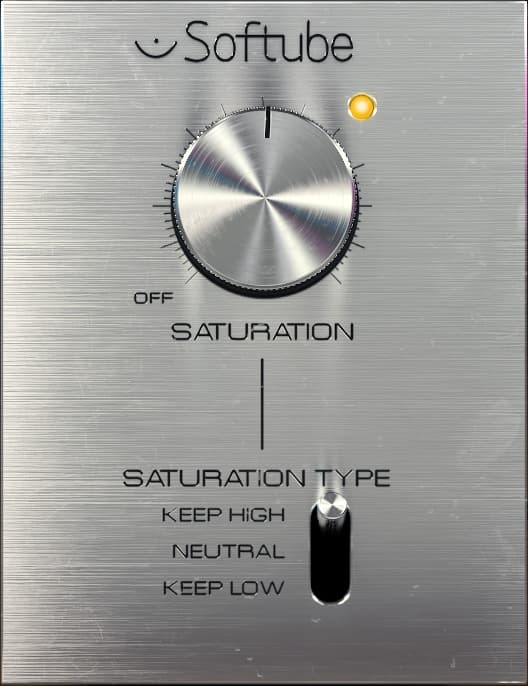
Saturation Knob
In the world of digital audio production, achieving the coveted warmth and character of analog gear can be a challenge. While modern DAWs and plugins offer pristine clarity and precision, they sometimes lack the organic imperfections that make vintage recordings so appealing. Enter the Softube Saturation Knob - a deceptively simple plugin that aims to bridge the gap between digital sterility and analog charm.
Released as a free gift to the audio community, the Saturation Knob has quickly become a go-to tool for producers and engineers seeking to add a touch of grit and soul to their tracks. Its straightforward interface and versatile sound have earned it a place in countless plugin collections, from bedroom studios to professional facilities.
The Interface
The Saturation Knob's user interface is a masterclass in minimalism. The centerpiece is a single large knob that controls the amount of saturation applied to the input signal. Turning the knob clockwise increases the effect, ranging from subtle harmonic enhancement to full-blown distortion.
Below the main knob sits a three-position switch labeled "Keep Low," "Neutral," and "Keep High." This switch allows users to focus the saturation effect on specific frequency ranges. In the "Keep Low" position, the plugin preserves the integrity of the low end while saturating the midrange and treble frequencies. "Neutral" applies saturation evenly across the entire spectrum, while "Keep High" targets the lows and mids, leaving the high end untouched.
The interface is rounded out by an understated VU meter that provides visual feedback on the level of the processed signal. The overall aesthetic is clean and functional, with a sleek black background and white text that echoes the look of classic analog gear.
Under the Hood
Despite its simple exterior, the Saturation Knob is a powerful tool with a lot going on behind the scenes. The plugin utilizes a combination of waveshaping and frequency-dependent drive to simulate the nonlinear behavior of analog circuits.
Waveshaping is a type of distortion that alters the shape of the input waveform, adding harmonic content and changing the timbre of the sound. The Saturation Knob's waveshaping algorithm is designed to mimic the gentle clipping and compression characteristics of vintage preamps and consoles.
Frequency-dependent drive, on the other hand, allows the plugin to apply different amounts of saturation to different parts of the frequency spectrum. This is what enables the "Keep Low" and "Keep High" modes to preserve the clarity of the bass or treble while still adding grit to the rest of the signal.
Under the hood, the Saturation Knob is meticulously crafted to balance authenticity and usability. The plugin's DSP code is optimized for efficiency, ensuring low CPU usage even when used on multiple tracks or instances.
Compatibility and System Requirements
One of the strengths of the Saturation Knob is its broad compatibility with a variety of platforms and plugin formats. The plugin is available in VST, AU, AAX, and RTAS versions, making it suitable for use in most major DAWs on both Windows and Mac operating systems.
For Reason users, the Saturation Knob is also available as a Rack Extension, allowing seamless integration with Propellerhead's popular music production software.
The plugin requires a free iLok user account for license activation, but importantly, it does not require a physical iLok dongle. This means that users can easily authorize the plugin on their computers without the need for additional hardware.
In terms of system requirements, the Saturation Knob is relatively lightweight and should run smoothly on most modern machines. The plugin is available in both 64-bit and 32-bit versions, ensuring compatibility with a wide range of systems.
Applications and Use Cases
The beauty of the Saturation Knob lies in its versatility. While it excels at adding subtle warmth and character to individual tracks, it can also be used as a creative effect for more extreme sound design.
Fattening Up Bass Lines
One of the most common uses for the Saturation Knob is to add weight and presence to bass instruments. By applying a touch of saturation with the "Keep Low" mode engaged, users can enhance the harmonics of a bass guitar or synthesizer, making it sound fuller and more powerful in the mix.This technique is particularly effective on DI'd bass tracks, which can often sound thin and lifeless without the coloration of an amp or preamp. The Saturation Knob can simulate the gentle clipping and compression of a vintage bass amp, giving the track more grit and attitude.
Adding Shimmer to Vocals
Another popular application for the Saturation Knob is to add air and brilliance to vocal tracks. By using the "Keep High" mode and applying a subtle amount of saturation, users can emphasize the upper harmonics of a vocal performance, making it sound more present and intimate.This effect can be especially useful for vocals that were recorded with a dull or dark-sounding microphone. The Saturation Knob can help to open up the top end without sounding harsh or artificial, giving the vocal a sense of sparkle and clarity.
Gluing a Mix Together
In addition to its uses on individual tracks, the Saturation Knob can also be employed as a mix bus processor to add cohesion and glue to an entire arrangement. By placing an instance of the plugin on the master channel and dialing in a small amount of saturation with the "Neutral" mode engaged, users can subtly blend the elements of a mix together, creating a more unified and polished sound.This technique is often used to emulate the gentle saturation and compression of a vintage mixing console, which can help to make a digital mix sound more analog and organic. By applying the effect sparingly and adjusting the levels of individual tracks to sit properly in the mix, users can achieve a professional-sounding result without overprocessing.
Creative Destruction
While the Saturation Knob is primarily designed for subtle enhancement, it can also be pushed to extremes for creative effect. By cranking the saturation knob past 75%, users can introduce heavy distortion and clipping, completely transforming the character of a sound.This can be useful for creating aggressive synth leads, crunchy guitar tones, or lo-fi drum loops. Experimenting with the different frequency modes and combining the Saturation Knob with other effects like EQ and compression can yield endless possibilities for sound design.
Conclusion
The Softube Saturation Knob is a testament to the power of simplicity. By providing a single intuitive control and a handful of well-chosen options, the plugin empowers users to quickly and easily add analog warmth and character to their digital recordings.Whether used subtly to enhance individual tracks or more aggressively for creative effect, the Saturation Knob is a valuable tool for any producer or engineer looking to bridge the gap between the digital and analog worlds. Its excellent sound quality, low CPU usage, and broad compatibility make it a must-have for any plugin collection.While the plugin's simplicity is one of its strengths, it's important to use it judiciously and with intention. Overusing saturation can quickly lead to a muddy, unfocused mix, and the lack of input/output level controls means that users need to be mindful of gain staging and levels throughout their signal chain.Ultimately, the Softube Saturation Knob is a powerful tool in the right hands. By understanding its capabilities and limitations, and using it in service of a well-crafted arrangement and mix, users can unlock the plugin's full potential and elevate their productions to new heights of analog warmth and character.