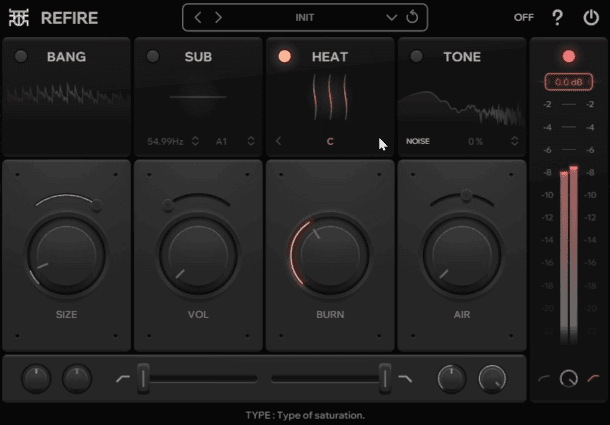
Refine Drum MultiFX
In the ever-evolving world of music production, having the right tools to shape and enhance your drum sounds is crucial. Enter Refire, a powerful and versatile drum processing plugin that's taking the audio world by storm. In this comprehensive guide, we'll explore the features of Refire and how you can leverage its capabilities to elevate your drum tracks to new heights.
What is Refire?
Refire is a free drum effect plugin that packs a punch with its five distinct modules: Bang, Heat, Sub, Detail, and Clamp. Each module is designed to tackle specific aspects of drum sound design, from transient shaping to saturation and beyond. Let's dive into each module and discover how they can transform your drum sounds.
1. Bang: The Transient Shaper
The Bang module is your go-to tool for controlling the attack and sustain of your drum hits. Whether you want to add punch to a lackluster kick or tighten up a snare, Bang has got you covered. With its adjustable envelope and gain control, you can fine-tune the transient response of your drums with surgical precision.
Pro Tip: Experiment with the different envelope modes (Precise, Balanced, and Loose) to find the perfect balance between impact and sustain for your drum sounds.
2. Heat: The Waveshaper
Looking to add some warmth and character to your drums? The Heat module is your secret weapon. This waveshaper offers three distinct flavors of distortion, allowing you to dial in anything from subtle saturation to aggressive overdrive. The dynamic response control ensures that your drums retain their natural feel even when heavily processed.
Pro Tip: Try layering different distortion flavors by applying Heat to individual drum elements and then to the entire drum bus for a rich, complex sound.
3. Sub: The Subharmonic Oscillator
For those times when you need to add some serious low-end weight to your kicks and basses, the Sub module has you covered. This subharmonic oscillator allows you to generate frequencies well below the original sound, adding depth and power to your drum tracks.
Pro Tip: Use the detune and PWM controls to create movement and texture in your subharmonics, preventing them from sounding static or one-dimensional.
4. Detail: Filters and White Noise Generator
The Detail module is all about adding those finishing touches to your drum sounds. With its high-shelf and tilt filters, you can sculpt the high-end response of your drums with precision. The white noise generator is perfect for adding air and texture to your snares and hi-hats.
Pro Tip: Use the tilt filter in conjunction with the high-shelf to create a unique frequency balance that helps your drums cut through the mix without sounding harsh.
5. Clamp: Soft or Hard Clipper
Last but not least, the Clamp module gives you ultimate control over the dynamics of your drum sounds. Whether you prefer the smooth rounding of soft clipping or the aggressive edge of hard clipping, Clamp allows you to shape the peak levels of your drums with ease.
Pro Tip: Experiment with different clipping thresholds and ratios to find the sweet spot between punch and control for your drum bus.
Putting It All Together: Advanced Techniques
The true power of Refire lies in its ability to combine these modules in creative ways. Here are a few advanced techniques to try:
- Layered Distortion: Use Bang to shape the transient, then apply multiple stages of Heat with different settings to create a rich, layered distortion effect.
- Subharmonic Enhancement: Combine Sub with Heat to add not just low-end weight, but also harmonic richness to your kicks and basses.
- Textured Transients: Use Bang to shape the attack, then add Detail's white noise generator and filters to create unique, textured transients that cut through the mix.
- Dynamic Saturation: Use Clamp to control peaks, then apply Heat with a high dynamic response setting to create a saturation effect that reacts to the dynamics of your drums.
- Air and Punch: Combine Detail's high-shelf filter with Bang's attack enhancement to create drums that are both punchy and airy.
Conclusion
Refire is more than just another drum processing plugin – it's a complete toolkit for shaping and enhancing your drum sounds. Whether you're working on hard-hitting EDM beats or organic indie rock grooves, Refire provides the flexibility and power to take your drums to the next level.
The best part? Refire is completely free, making it an essential addition to any producer's plugin collection. So why wait? Download Refire today and start exploring the endless possibilities it offers for your drum production.
Remember, great drum sounds are the foundation of a great mix. With Refire in your arsenal, you're well-equipped to create drum tracks that not only sound professional but also uniquely yours. Happy producing!