Pitchmunk
Pitch shifting is an essential tool for modern music production, allowing you to transform the pitch and formant of any sound in creative ways. While there are many great paid pitch shifter plugins available, Vox Samples has just released Pitchmunk - a completely free pitch shifter VST/AU plugin for Windows and Mac that delivers professional results. In this in-depth review, we'll take a close look at Pitchmunk's features, sound quality, and usability to help you decide if it's the right pitch shifting solution for your music productions.
Overview of Pitchmunk's Features
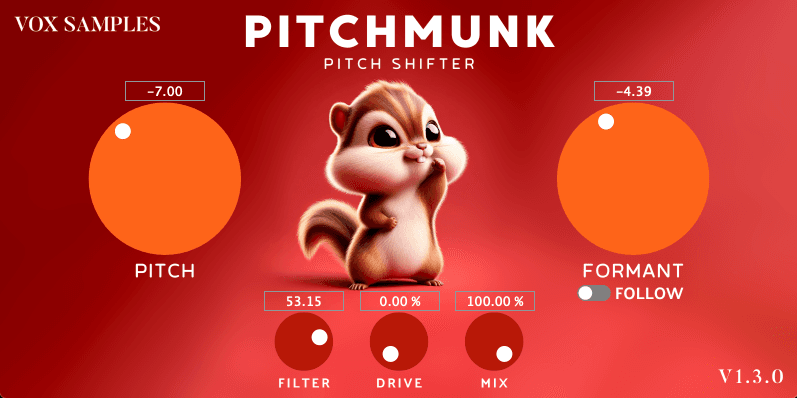
Pitchmunk packs an impressive set of pitch and formant shifting capabilities into a streamlined interface[1]:
- Shift pitch up or down by up to 2 octaves (48 semitones total)
- Continuous (non-stepped) pitch adjustment for smooth, gradual shifts
- Independent control over pitch and formant
- "Follow" mode links formant to pitch for a crisper sound
- Built-in filter, drive, and mix controls for additional tone shaping
- Resizable interface with a fun, quirky cartoon chipmunk graphic
The plugin is very CPU efficient and the simple controls make it quick and easy to dial in the sound you want. It supports the VST3 and AU plugin formats on both Windows and Mac (64-bit only)[1].
Sound Quality
To really put Pitchmunk through its paces, I tested it out on a variety of sources including vocals, guitars, synths, and even a full drum loop. I was impressed by the overall sound quality, especially considering this is a free plugin.
The pitch shifting algorithm does a great job of preserving the character of the original sound, even when making drastic changes. Shifting vocals up or down by an octave still retained the clarity and presence of the original performance without obvious artifacts[1]. The non-stepped adjustment is great for creating smooth, continuous pitch bends and special effects.
Having independent control over pitch and formant is also very handy. You can use the "Follow" mode for a more natural sound, or unlink them to create unique timbres, like a low pitched voice with a high formant to simulate a "chipmunk" effect. The formant shifter has a distinct digital sound, but the quality is quite good for a free plugin[3].
I did notice that it struggled a bit and introduced some warbling artifacts when processing very dynamic or transient-heavy material, like shifting drum loops by large intervals[3]. But this is a common challenge for most pitch shifters. For the majority of sources, Pitchmunk does an admirable job.
The built-in filter, drive and mix controls are the icing on the cake, letting you quickly shape the tone to fit better in your mix. The drive adds some nice grit and aggression when pushed. And the mix knob is always appreciated for dialing in parallel processing[3].
Usability
Pitchmunk's user interface is a joy to use. The controls are all clearly labeled and laid out in a logical way. You can quickly get the results you want without menu diving or reading the manual.
I love that the pitch and formant knobs are nice and big, making it easy to make precise adjustments. The non-stepped adjustment is great for recording smooth automation moves. And you can always click the number displays to type in an exact value.
The UI is fully resizable, so you can make it as big or small as you like. The cartoon chipmunk graphic is a cute touch that adds some personality and charm[1].
My only minor quibble is I wish it had a built-in preset browser to save and recall your favorite settings. But that's hardly a deal breaker, especially for a free plugin. You can of course use your DAW's preset manager or save presets the old-fashioned way.
Comparison to Other Pitch Shifters
So how does Pitchmunk stack up against the competition? Let's compare it to a few other popular free and paid pitch shifter plugins:
- **Kilohearts Pitch Shifter** is another excellent free option that offers a simple, no-frills approach. It has a great sound and low CPU usage. But it lacks Pitchmunk's independent formant control and additional tone shaping features[5].
- **Waves SoundShifter** is an affordable paid plugin with a similar feature set to Pitchmunk. It offers very natural sounding pitch shifting and has a simple, intuitive interface. However, some users find the shifted sound can be a bit too clean and sterile[5].
- **Soundtoys Little AlterBoy** ($99) is a popular choice for creative pitch and formant effects. It has a distinct lo-fi character that's great for aggressive sounds. But it doesn't allow for continuous pitch adjustment like Pitchmunk[4].
- **Melda Production MAutoPitch** is a powerful free pitch correction and shifting plugin with automatic pitch detection and scale snapping. It's incredibly customizable, but the complex interface can be overwhelming for some users[2].
- **Zynaptiq Pitchmap** ($379) is a next-generation polyphonic pitch processor that can shift individual notes within chords and mixed signals. The results are incredibly transparent, but it comes with a hefty price tag[4].
While Pitchmunk may not be as full-featured as some of the paid options, I think it compares very favorably to other free pitch shifters in terms of sound quality and ease of use. And for many applications, it's all you really need.
Conclusion
Pitchmunk is a fantastic new free pitch shifting plugin from Vox Samples. It covers all the basics and then some, with a great sounding algorithm, independent pitch and formant control, and useful tone shaping options. The interface is intuitive and fun to use, striking a good balance between simplicity and flexibility.
Whether you're looking to create subtle vocal harmonies, monster sound effects, or anything in between, Pitchmunk is a solid choice. It's an especially good option for beginners or those on a budget. While it may not have all the bells and whistles of more expensive plugins, it definitely punches above its price class.
If you're in the market for a free pitch shifter plugin, I highly recommend giving Pitchmunk a try. It's available now as a free download for Windows and Mac in VST3 and AU formats.