PanCake 2
PanCake 2 is a free VST/AU plugin from German developer Cableguys that provides powerful and creative auto-panning effects. Released as an update to the original PanCake in 2014, version 2 adds several new features while remaining completely free to download and use on both Windows and Mac.
PanCake 2 has been praised as a "wacky, customizable, over-the-top stereo panner" that takes the concept of auto-panning to "loony extremes". Its signature feature is the ability to draw your own panning modulation shapes, allowing you to create gentle transitions or sharp, rhythmic panning effects.
Let's take an in-depth look at PanCake 2's features and how you can use it to add dynamic motion and width to your mixes.
Features
Waveform Drawing
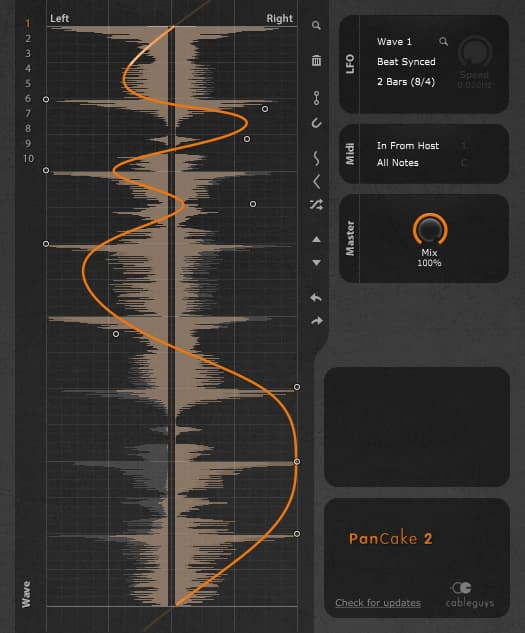
The heart of PanCake 2 is its waveform drawing interface. You can construct your own panning modulation curves by placing and dragging nodes on the plugin's central display.
These nodes can be set to either soft or hard control points. Soft points create gentle, curved transitions between nodes, while hard points result in sharp angles and abrupt changes in the panning shape.
This allows you to create anything from basic panning effects like slow sweeps and tremolo to complex, evolving modulation patterns. Up to 10 custom waveforms can be saved within a single instance of the plugin.
LFO Sync and Speed
PanCake 2's panning modulation can be tempo-synced to your DAW's timeline, with rates ranging from 1/128 notes up to 32 bars. This covers everything from rapid, rhythmic effects to gradual panning movements that evolve over multiple measures.
The LFO can also be set to run freely with a speed from 0.02 Hz up to 5.24 kHz. At the upper end of this range, you can even achieve ring modulation-style effects as the panning moves at audio rates.
MIDI Triggering
Another useful feature is the ability to trigger PanCake 2's LFO via MIDI notes. This allows you to sync the panning effect to your song in creative ways, starting the modulation in time with a drum hit or synth note, for example.
Visual Feedback
PanCake 2 provides precise visual feedback of the left and right channel levels as the sound is being panned. Seeing the levels move in real-time makes it easier to create and fine-tune the panning effect you want.
Automation
All of PanCake 2's parameters, including the shape of the modulation waveform itself, can be automated from your DAW. This opens up even more creative possibilities, like morphing between different panning shapes over time or changing the LFO speed dynamically throughout a song section.
Dry/Wet Control
Version 2 of PanCake added a dry/wet mix knob. This allows you to blend the auto-panned signal with the original dry sound, which is helpful for dialing in subtle panning effects that add motion without being too disorienting.
Sound Design Tips
So how can you use PanCake 2 to enhance your tracks? Here are a few ideas to get you started:
Subtle Modulation
Not every panning effect needs to be extreme or obvious. Try using a simple sine or triangle LFO shape at a slow speed to add gentle movement to pad sounds, synth leads, or guitars. This can help create a greater sense of width and space in your mix without disorienting the listener.
Rhythmic Gating
You can use PanCake 2 to create rhythmic gating effects by drawing in hard-angled waveforms and syncing the LFO to your song's tempo. Experiment with different note values to create panning patterns that lock to your beat. This works especially well on percussion sounds, synth plucks, and chopped-up samples.
Pumping and Breathing
For pumping and breathing effects, try using a short attack and release time on a compressor or volume shaper plugin after PanCake 2 in your effects chain. Each time the panning modulation switches sides, you'll get a pumping effect as the compressor reacts. You can sync this to your song's rhythm for interesting results.
Pseudo-Stereo
If you have a mono sound that you'd like to artificially widen, you can use two instances of PanCake 2 panned hard left and right with inverse modulation shapes. For example, use a sine wave LFO on one instance and a cosine wave on the other. This will cause the mono signal to alternate between speakers and create a pseudo-stereo effect.
Extreme Effects
Of course, you can also get creative with extreme, over-the-top panning effects. Try drawing in jagged, complex modulation shapes and running the LFO at audio rates for unique timbres and textures. This can work well on risers, sound effects, and glitch-style edits to add an aggressive, in-your-face character.
Comparisons
If you like the concept of PanCake 2 but want even more panning features, Cableguys also offers PanShaper, the "big sibling" of PanCake. PanShaper adds more advanced options like:
- Multiband panning with up to 3 frequency bands
- Additional panning modes like stereo width and mid/side
- An expanded library of preset modulation shapes
- Integrated effects like filters, distortion, and modulation.
Of course, PanShaper is a paid plugin, while PanCake 2 remains freeware. For many users, PanCake 2 offers more than enough flexibility for creative panning effects.
Other popular auto-panning plugins include:
Soundtoys PanMan
Offers a variety of vintage-style panning modes and the ability to trigger panning via audio or MIDI input.
Melda Production MAutoPan
Features an extensive modulation section with multiple LFOs, step sequencers, and envelopes.
Audiothing Outer Space
A "space-based" auto-panner with built-in reverb and echo effects.
Each of these has its own unique feature set and sonic character. But for a free, intuitive, and powerful auto-panning solution, PanCake 2 is hard to beat.
Conclusion
For a free plugin, PanCake 2 is a remarkably flexible tool for creative panning effects. Its waveform drawing interface and comprehensive features make it easy to dial in anything from subtle movement to extreme, rhythmic panning.
While it may not have all the bells and whistles of some more advanced plugins, PanCake 2 delivers where it counts. And with the ability to automate every parameter, you can craft evolving, dynamic panning effects that help add life and motion to your mixes.
Whether you're looking to add some gentle width, lock a sound's movement to your song's groove, or create over-the-top special effects, PanCake 2 is a great option. And at the unbeatable price of free, there's no reason not to add this powerful tool to your plugin collection.
Some links on this page are affiliate links. We may earn a commission at no cost to you.